
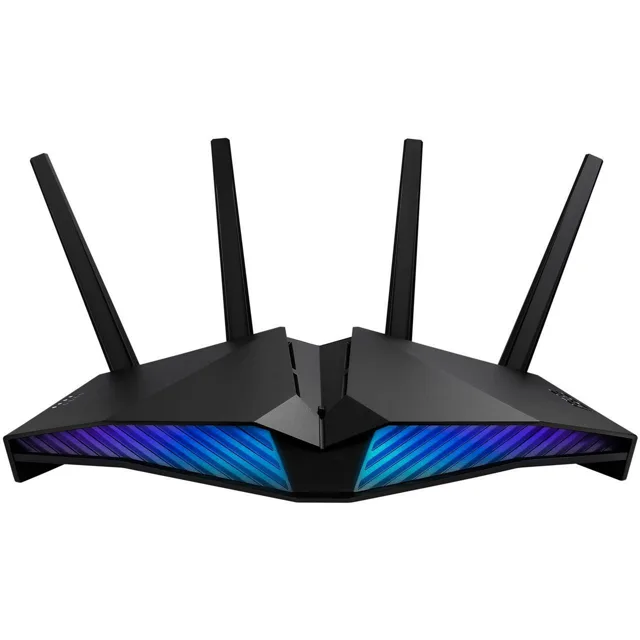
ASUS RT-AX82U Wi-Fi 6 Router Review
We may earn a commission from some links on this page.
Consider the ASUS RT-AX82U when a router upgrade is about a crowded home network rather than a new wireless band. It is a dual-band Wi-Fi 6 router, so it works on 2.4GHz and 5GHz and has no 6GHz band of its own. What it does bring is a dedicated gaming port, priority modes for a console or a PC, and AiMesh support so a second ASUS router can extend the network later. If a 6GHz band is the whole reason for buying, this is not that router, and the alternatives below say which one is.
Table of Contents
Key Takeaways
- ASUS lists the RT-AX82U as a dual-band Wi-Fi 6 router with total speeds up to 5400Mbps.
- One LAN port is reserved as a gaming port, so a console or PC plugged into it takes priority.
- Gear Accelerator and Mobile Game Mode do the same job for wireless devices, from the ASUS Router app.
- AiMesh support lets a second ASUS router extend the network, and DFS opens up to 15 extra 5GHz channels.
- The security bundle is AiProtection Pro with WPA3 and parental controls.
Wi-Fi 6 on Two Bands
Wi-Fi 6 is the standard the RT-AX82U is built on, and ASUS puts the combined speed at up to 5400Mbps across the 2.4GHz and 5GHz bands. The split matters more than the total: the 5GHz band carries the fast traffic and the 2.4GHz band carries the devices that only speak that band, which is most smart plugs, sensors and older gadgets. ASUS advises connecting the devices that need speed to 5GHz and leaving 2.4GHz to the rest, which is ordinary practice rather than a special feature.
Because there is no 6GHz band, the router does not have the extra clear channel that a Wi-Fi 6E model adds. In a block of flats where 5GHz is congested, that is the difference that matters, and it is the reason to look at a newer model. For a house where 5GHz still works well, the 5400Mbps figure and the wired ports give the same practical result: more room for several devices at once.
Gaming Port and Priority Modes
The feature that separates this router from a basic model is the gaming port. ASUS reserves one LAN port for a gaming PC or console, and anything connected to it is placed at the front of the queue without any configuration. Gear Accelerator does the same for wireless devices, prioritising them through the app. Mobile Game Mode is a single tap in the same app that turns on the low-latency settings for a phone game.
The practical effect is limited to the device that needs it. On a busy evening, the machine in the gaming port keeps its priority while other devices wait their turn, which is what a household with one heavy user wants. It is not a faster internet connection: the router cannot deliver more than the line brings in.
AiMesh and the DFS Channels
Coverage is handled two ways. AiMesh lets the RT-AX82U join a whole-home network with other ASUS routers, with central control and roaming between units, so a second ASUS router can be added rather than replaced wholesale. On its own, the router also supports Dynamic Frequency Selection, which ASUS says unlocks up to 15 of the least-congested channels on the 5GHz band. Those channels sit alongside radar systems and are shared, so the router has to move when it detects one, but in a crowded area they are often the quietest space available.
ASUS also lists link aggregation: two separate 1Gbps internet services can be combined through the WAN port and a LAN port for up to 2Gbps. That is a niche feature for a household with two lines, and it is worth knowing the ports are shared with the normal LAN duties rather than being extra.
Security, App and Setup
ASUS bundles AiProtection Pro on the router, which it describes as lifetime free, with WPA3 and parental controls included. The protection covers the whole network rather than one device, which is the sensible place for it when the household includes appliances and other hardware that cannot run antivirus software. The parental controls are managed from the same app as the rest of the settings.
Setup and day-to-day control run through the ASUS Router app, and the router also carries Aura RGB lighting that can be set to different modes or left alone. ASUS also lists a dust-resistant fan design for cooling. None of this changes the wireless performance, but it is the difference between a router that is set up once and forgotten and one that needs a cable and a laptop every time a setting changes.
Detailed Features
The table collects what ASUS publishes for the RT-AX82U, so the wireless standard, the gaming features and the security bundle sit in one place.
| Feature | What ASUS lists |
|---|---|
| Wireless standard | Dual-band Wi-Fi 6 (802.11ax) |
| Speed | Up to 5400Mbps combined |
| Bands | 2.4GHz and 5GHz, with DFS on 5GHz |
| Gaming features | Dedicated gaming LAN port, Gear Accelerator, Mobile Game Mode |
| Mesh | ASUS AiMesh compatible |
| Security | AiProtection Pro with WPA3 and parental controls |
| Wired | Link aggregation of two 1Gbps services up to 2Gbps through the WAN and a LAN port |
| Lighting | ASUS Aura RGB with several modes |
| Cooling | Dust-resistant fan design |
Advantages and Disadvantages
The strengths are the ones a busy household notices. The gaming port and the priority modes give a console or PC a reliable place in the queue without any setup, AiMesh makes it easy to add coverage later with another ASUS unit, and the security bundle is included rather than sold as a subscription. DFS channels are a genuine help in a crowded building, and the app keeps ordinary changes out of a browser settings page.
The limits start with the missing 6GHz band. Anyone buying specifically for that extra clear channel needs a Wi-Fi 7 model instead, and this router cannot provide it whatever the settings. The gaming features favour one device over the rest, which is the point but also the trade-off. Link aggregation needs two internet services to be useful. The version sold here is refurbished: the shop describes it as professionally refurbished, with all original accessories and documentation and a 30-day return window.
Verdict
The RT-AX82U suits a household that wants a solid dual-band Wi-Fi 6 router with a wired gaming port and a mesh path for later. It is a sensible upgrade from an older router when 5GHz is still usable where you live, and the included security bundle saves a subscription.
It is the wrong buy if the plan was to move to the 6GHz band. The ASUS ROG Strix GS-BE18000 carries that band as part of a tri-band Wi-Fi 7 design with eight 2.5G ports. The ASUS RT-AX1800S is the other direction: a plain dual-band Wi-Fi 6 router with four gigabit LAN ports.
Frequently Asked Questions
Does It Have a 6GHz Band?
No. The RT-AX82U is a dual-band Wi-Fi 6 router working on 2.4GHz and 5GHz. A 6GHz band is a feature of Wi-Fi 6E and Wi-Fi 7 models, and this is neither.
What Speed Does It Reach?
ASUS puts the combined speed at up to 5400Mbps across the two bands. The internet connection, not the router, sets the real download speed.
Can It Be Extended with Another Router?
Yes. ASUS AiMesh lets it form a whole-home network with other ASUS routers, with central control and roaming between units.
Does the Gaming Port Matter?
It gives one wired device priority over the rest without configuration. It does not raise the speed of the internet line itself.
Is It Refurbished?
Yes. The RT-AX82U sold here is a refurbished unit: the shop describes it as professionally refurbished, with all original accessories and documentation and a 30-day return window.