GL.iNet Spitz GL-X750V2 Review
We may earn a commission from some links on this page.
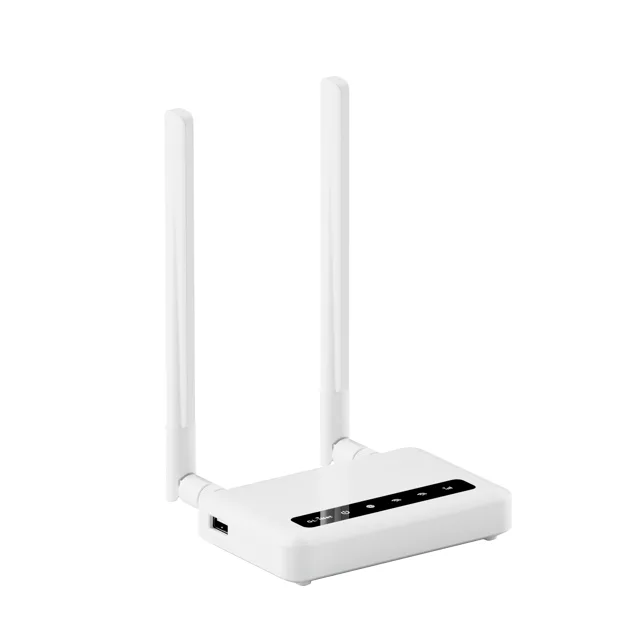
The GL.iNet Spitz GL-X750V2 is a 4G LTE router rather than a pocket hotspot. It takes a SIM card, connects to the mobile network and shares that connection over dual-band Wi-Fi, in the way a home router shares a fixed line. That makes it a different tool from a battery-powered hotspot: it is built to cover a place with Wi-Fi, not to follow you around. This review looks at what that format is good for and the decisions that come with it.
Table of Contents
Key Takeaways
- This is a 4G LTE router: a SIM supplies the connection and the router shares it over dual-band Wi-Fi.
- It suits a place with several devices, such as a second home, a holiday let or a caravan, rather than a pocket.
- A SIM and a suitable data plan are separate purchases, and the bands have to match the carrier you use.
- A router like this keeps a fixed network name, so devices stay connected without re-tethering a phone.
- Coverage and congestion at the location decide the real speed, whatever the router is capable of.
What a 4G Router Does
A 4G LTE router works the way a home router does, with one difference at the back: instead of a cable from the wall, the connection arrives over the mobile network through a SIM card. Everything after that point is familiar. The router holds the connection, hands out addresses to the devices on the network and broadcasts Wi-Fi so laptops, phones, a television or a smart speaker can all use it at once.
The Spitz is the desktop format of that idea. GL.iNet lists it as a dual-band Wi-Fi router with 4G LTE, which is the combination to look for when a place needs a permanent network rather than a temporary one. Dual-band means the usual two radio bands, one for reach and one for speed, so older devices and newer ones can both connect.
SIM, Data Plan and Coverage
The router is only half of the connection. The other half is a SIM card with a data plan, and that is a separate buying decision with its own rules. Some plans are sold for phones and restrict tethering or router use, some are meant for mobile broadband and some are tied to a contract. Read the terms of the plan before assuming any SIM will do.
Bands matter as much as the plan. A 4G router has to support the frequencies your carrier uses where the router will sit, and that is worth checking before buying rather than after. Coverage is the other variable: a router cannot create a signal, so the speed at the location depends on what the network delivers there, and on how busy the local cell is at the time.
Two related options are worth knowing. The GL.iNet Beryl AX is a pocket-sized travel router for sharing a connection you already have, and the GL.iNet Slate 7 Pro is the tri-band step up for a faster local network.
Router or Phone Hotspot
A phone can share its connection in a few taps, so why add a router? The answer is what happens over hours and days rather than minutes. A router keeps the network up without tying up the phone, does not drain the phone's battery to run the Wi-Fi, and holds the same network name so devices reconnect on their own. For a place that needs internet every day, that is a calmer arrangement.
The trade-off is that a router is a thing to install rather than a thing to carry. It needs a spot with a decent signal and a power socket, and it needs a SIM and plan that are meant for it. A pocket hotspot, or a phone, is the better choice for a day out or a single meeting.
Detailed Features
The table collects what GL.iNet publishes in its listing for the Spitz.
| Feature | What GL.iNet lists |
|---|---|
| Model | Spitz GL-X750V2 |
| Cellular | 4G LTE, through a SIM card supplied separately |
| Wi-Fi | Dual-band |
Advantages and Disadvantages
The strengths are the format. A dedicated cellular router gives a place its own network with a stable name, keeps the phone out of the job and lets several devices share one connection without tethering. Dual-band Wi-Fi covers both older and newer hardware, and buying from the maker means the model is the one it is described as.
The weaknesses are the dependencies. The router needs a SIM and a data plan, and the plan has to allow router use. Bands must match the carrier at the location, and the real speed depends on coverage and congestion rather than on the router. It is also not a pocket device, so a reader who wants connectivity that moves with them should look at a hotspot or a travel router instead.
Verdict
The Spitz is for a place that needs its own internet: a second home, a let, a cabin or a backup line for a small office. It does one job well, which is turning a mobile connection into an ordinary Wi-Fi network that everything can join. Buy it with the SIM and plan question settled first, and check the bands for your carrier, because without those two answers the router has nothing to share.
Frequently Asked Questions
Does It Need a SIM Card?
Yes. It is a 4G LTE router, so the connection comes from a SIM card and a data plan rather than from a cable. The SIM is not included.
Will It Work With My Carrier?
That depends on the bands your carrier uses and the ones the model supports. Check both before buying, and check that the plan allows router use.
How Many Devices Can Join?
As with any Wi-Fi router, several devices share the one connection. The practical limit is the speed of the mobile link, not the number of devices on the network.
Is It a Pocket Hotspot?
No. It is a router for a fixed spot with a Wi-Fi network of its own. A pocket hotspot or a phone is the better fit when the connection has to move with you.