
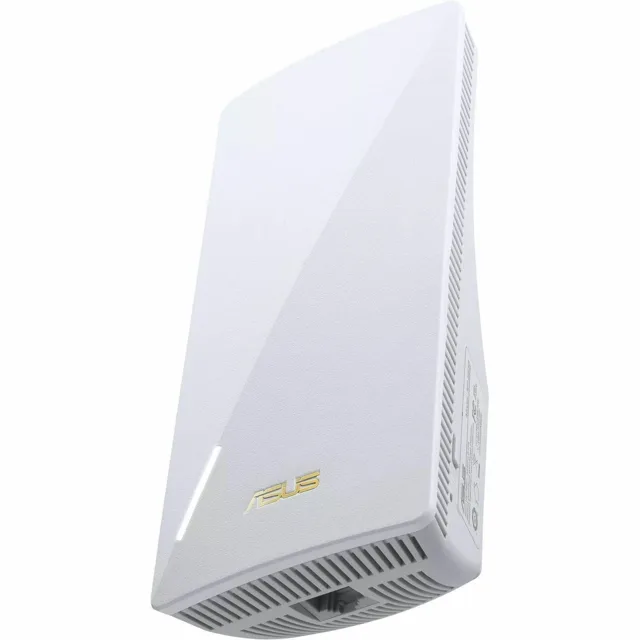
ASUS RP-BE58 Range Extender Review
We may earn a commission from some links on this page.
The ASUS RP-BE58 is a plug-in range extender that repeats an existing WiFi network into the rooms it does not reach. ASUS lists it as a BE3600 dual-band WiFi 7 (802.11be) model, with combined speeds up to 3600 Mbps, multi-link operation, 160 MHz channels and coverage up to 2,200 square feet. It can also join an ASUS AiMesh system, and ASUS says it works with nearly any router, modem or gateway, not only ASUS ones. The unit reviewed here is a refurbished listing, described as professionally refurbished and working as intended. This review covers what the maker lists, where a unit like this belongs in a home, and the compromises that come with extending a network rather than replacing it.
Table of Contents
Key Takeaways
- ASUS lists the RP-BE58 as a BE3600 dual-band WiFi 7 extender, with combined speeds up to 3600 Mbps across the 2.4 GHz and 5 GHz bands.
- Multi-link operation lets the unit use more than one band at the same time, which is the main technical difference from the WiFi 6 extenders that came before it.
- ASUS gives the coverage as up to 2,200 square feet, which is the figure to compare against the rooms that currently lose signal.
- It works with nearly any router and also joins an ASUS AiMesh system, where a compatible ASUS router can share its features across the network.
- Faster figures depend on the router and the client devices: a WiFi 6 phone will not reach WiFi 7 speeds just because the extender supports them.
What the RP-BE58 Is
The RP-BE58 is a single plug-in unit, the kind that goes into a wall socket partway between the router and the room with the weak signal. It is managed from the ASUS app, or from the router when it joins an ASUS AiMesh system.
The model name carries the important specification. BE is the WiFi 7 standard, and 3600 is the combined speed class across both bands, in the same way that dual-band extenders add their 2.4 GHz and 5 GHz figures together. In practice that means the number describes the total the hardware can carry rather than the speed any one device will see across a room.
ASUS sells the RP-BE58 as a range extender and as an AiMesh extender, which are two different jobs in one box. As a plain extender it repeats whatever network it is connected to. As part of an AiMesh system it becomes a node that a compatible ASUS router manages, and ASUS states that the features of the connected ASUS router then apply across the whole network. If you already run an ASUS router, that second role is the one worth having. If you do not, the extender role is what you get, and ASUS says it is compatible with virtually all routers, modems and cable gateways.
WiFi 7 Speeds, MLO and 160 MHz
The headline claim is WiFi 7 with 4096-QAM, which ASUS says raises a single band's transmission speed by about 1.2 times compared with the older modulation. That is a real gain, but it is a gain at the edge of the signal: the further a device is from the unit, the more the modulation falls back to something more robust and the smaller the advantage becomes. An extender is usually placed at exactly that edge, so the honest way to read the number is as headroom for devices close to the unit rather than a guarantee for the far corner of the house.
Multi-link operation is the more useful part. ASUS describes it as linking to multiple bands at the same time to keep the connection stable and the transfers efficient, instead of a device picking one band and staying on it. On a busy home network that matters more than the peak figure, because the usual complaint is not a slow speed test next to the router but a call that breaks up in the back room.
The unit also supports 160 MHz channels, which ASUS lists as delivering faster transfers and lower latency. Two caveats belong with that: 160 MHz channels need a clear stretch of spectrum, and ASUS notes that the 5 GHz band may not offer the full width in some regions because of local rules. The other caveat is the one buyers skip. All of this needs a router and client devices that speak the same standard to be worth anything. A WiFi 7 extender connected to an older router still extends that older network, and a phone that supports only WiFi 6 will connect at WiFi 6 speeds.
Coverage and Where to Put It
ASUS gives the coverage as up to 2,200 square feet. Treat that as the size of the area the unit is meant to serve from its position, not as a promise about a whole house with thick internal walls, and compare it with the rooms that actually lose signal rather than with the floor plan.
Placement decides whether an extender helps or makes things worse. The unit needs a strong enough signal from the router to repeat, so it belongs roughly halfway between the router and the dead spot, not in the dead spot itself. A socket in a hallway or on the wall of the room next door usually works; a socket behind a television, inside a cupboard or against a brick chimney breast usually does not. Because the unit plugs into a wall socket, the position is limited by where the sockets are, which is the practical drawback of this shape compared with a mesh node that sits on a shelf.
One more limit is worth stating plainly: a repeater halves the useful throughput on the band it repeats, because it has to receive and transmit the same traffic. That is true of every extender in this class, including this one, and it is why a wired connection or a mesh system with a dedicated backhaul is better where the building allows it. If the gap is small and the devices in that room are older, a cheaper AC extender is enough; if the house has never had good coverage, a mesh pair or a new router is the better spend than a second repeater.
AiMesh, App Setup and AP Mode
Setup runs through the ASUS Extender app, or through the ASUS Router app when the unit is joining an AiMesh system. ASUS also lists a WPS button for a one-touch connection to a non-ASUS router. The two setup routes are not interchangeable: ASUS states that WPS and the Extender app setup do not apply when the RP-BE58 is working as an AiMesh node, where the router app takes over.
Access point mode is the feature to look for if the room with the weak signal happens to have an Ethernet socket. In AP mode the unit uses the cable for its connection to the network and broadcasts WiFi from there, which avoids the halving that comes with repeating a wireless signal. ASUS lists AP mode support, and for a home with cabling already in the walls it is the configuration that gets the most out of a unit like this.
The AiMesh side is the reason to pick this model over a no-name extender if you own an ASUS router. A mesh node is managed by the router, shares one network name and hands devices between nodes as they move, which is a different experience from two separate networks with two names. Outside an AiMesh system the unit still works, but it behaves like an ordinary extender rather than part of a managed network.
Detailed Features
The table below collects what ASUS lists for the RP-BE58, in the maker's own terms rather than a summary of a specification sheet.
| Feature | What ASUS lists |
|---|---|
| Standard | WiFi 7 (802.11be), dual-band |
| Speed class | BE3600, up to 3600 Mbps combined |
| Modulation | 4096-QAM, about 1.2 times the speed of the previous generation per band |
| Multi-link | Multi-link operation across bands |
| Channel width | 160 MHz channels, subject to regional rules |
| Coverage | Up to 2,200 square feet |
| Compatibility | Nearly any router, modem or gateway; AiMesh with compatible ASUS routers |
| Modes and setup | Extender or AiMesh node, AP mode, ASUS Extender app, WPS button |
Advantages and Disadvantages
The case for the RP-BE58 rests on three things. It is a current-standard unit rather than a clearance model, so it should stay current longer than an older-generation extender would. It can join an AiMesh system, which is the difference between a managed network and a second network name that devices refuse to leave. And it works with routers from other brands, so buying it does not commit you to replacing the router as well.
The case against it is the shape and the nature of extending. A wall-plug unit can only go where a socket is free, and it repeats rather than improves the signal it receives, so it cannot fix a house whose problem is a weak router in a bad position. The faster WiFi 7 figures also need WiFi 7 devices to matter, and most homes still have a mix of standards. Finally, a refurbished unit is cheaper but carries cosmetic wear by definition, so it suits a buyer who cares about the network working rather than the box being untouched.
- Current WiFi 7 standard with multi-link operation and 160 MHz channels.
- Works as an AiMesh node with ASUS routers and as a plain extender with other brands.
- AP mode for a room that already has an Ethernet socket.
- Wall-plug shape limits where it can be placed.
- Repeating halves throughput on the repeated band, as with any extender.
- The fastest speeds need a matching router and matching devices.
Verdict
The RP-BE58 makes sense for a specific household: one with a reasonable router, one or two rooms that lose signal, and a free socket roughly halfway between the two. In that situation a dual-band WiFi 7 extender with AiMesh support does the job and leaves the door open to a mesh system later. It is a poor first purchase for a home where the router itself is the problem, and it is unnecessary for a flat where a single cheap extender would cover the one weak corner.
Buy it if you want a current-standard unit that can become part of an ASUS mesh later and can be wired in AP mode where a cable exists. Look at a mesh pair instead if the coverage problem is the whole house, and at a cheaper AC extender if the gap is one room and the devices in it are older.
Frequently Asked Questions
Does It Work With a Router From Another Brand?
Yes. ASUS states that the RP-BE58 is compatible with virtually all WiFi routers, modems and cable gateways on the market, and that it can be set up with the ASUS Extender app or the WPS button when it is not part of an AiMesh system.
Do Phones Get the Full WiFi 7 Speed?
Only if the phone supports WiFi 7 as well. The extender extends the network it is connected to, so an older router or an older phone keeps its own limits. The higher figures apply to devices that support the same standard and are close enough to the unit to hold the faster modulation.
What Does Multi-Link Operation Do?
ASUS describes it as linking to more than one band at the same time, so the connection stays stable and transfers stay efficient instead of a device committing to a single band. It is the feature aimed at busy homes where stability matters more than a peak speed test.
How Is It Set Up?
Through the ASUS Extender app for a plain extender setup, through the ASUS Router app when it joins an AiMesh system, or with the WPS button on a non-ASUS router. ASUS notes that the WPS and Extender app route does not apply in AiMesh mode.
Can It Be Used With an Ethernet Cable?
Yes, in access point mode. With a cable to the network the unit broadcasts WiFi from its position without repeating a wireless signal, which avoids the throughput loss that comes with extender mode. It needs an Ethernet socket where the unit is placed.