
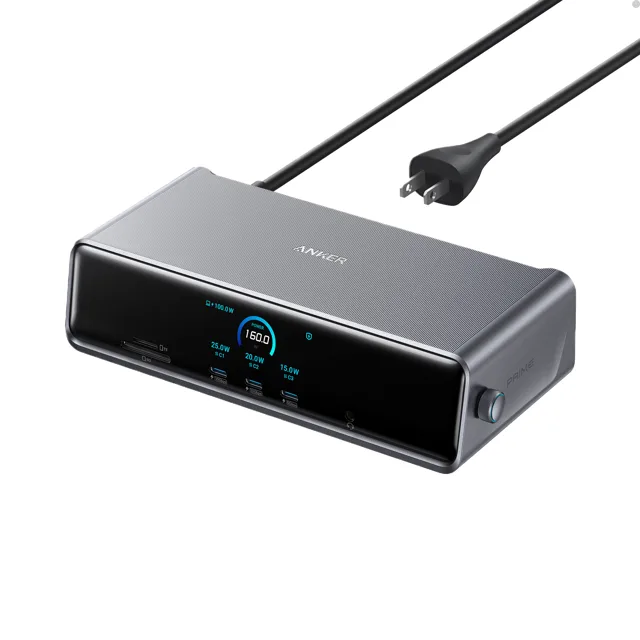
Anker Prime Docking Station Review
We may earn a commission from some links on this page.
The Anker Prime Docking Station is a 14-in-1 dock built around three external monitors. Anker lists two HDMI ports and one DisplayPort, an 8K output on one of the screens, and up to 140W of charging carried up the same USB-C cable that feeds the display signal. The trade for three screens on a laptop is DisplayLink: the dock needs its driver installed before the extra monitors light up. What follows is what the maker states about the dock, how its ports divide up, and what to have ready before the first screen comes on.
Table of Contents
Key Takeaways
- Fourteen connections run from a 140W USB-C upstream port to two HDMI, one DisplayPort, three more USB-C ports, three USB-A, 2.5Gbps Ethernet, a headphone and mic jack, and SD and TF card slots.
- Anker lists three external monitors at once, one of them at 8K, with support for both Windows and macOS.
- The upstream USB-C port charges a laptop at up to 140W, and each front USB-C port supplies up to 100W of charging.
- A small display on the front shows charging power, display performance and fan mode, and a built-in fan works with ActiveShield 3.0 to keep temperatures down.
- The box holds the dock, a 10Gbps USB-C cable, an AC cord and a 24-month warranty; the front USB-C ports do not carry a video signal.
Three Screens from One Cable
Most laptops will drive one or two external screens from their own ports. The Anker Prime Dock adds the monitors through DisplayLink, a driver-based approach that compresses the display signal and sends it down the USB-C cable, so a machine that is short of video outputs can still run a three-screen desk. Anker lists two HDMI ports and one DisplayPort for the monitors, with one of them reaching 8K on a screen that supports it.
The driver is the part to plan for. DisplayLink needs its software installed on the computer before the extra displays appear, and Anker states so plainly. On a work laptop where software installs are locked down, that is a question for whoever manages the machine before the dock is bought. On a personal Windows or Mac machine it is a normal download and install.
One detail catches people out: the USB-C ports on the front are for charging and data only. Anker says they do not support media display, so the monitors belong on the HDMI and DisplayPort sockets on the back.
The Fourteen Ports
The count adds up to a full desk rather than a row of adapters. The upstream USB-C port runs at 10Gbps and carries the laptop's data and charging. Three more USB-C ports, two at 10Gbps and one at 5Gbps and each delivering up to 100W, cover the rest of the USB-C gear, while two USB-A ports at 5Gbps and a slower 480Mbps USB-A port handle older peripherals such as a mouse receiver or a keyboard.
For a fixed desk the useful additions are the wired network and the card slots. The 2.5Gbps Ethernet port is faster than the gigabit connection most docks offer and is a steadier option for video calls and large file transfers than office Wi-Fi. The SD and TF slots mean a camera card can be read without hunting for a reader, which matters if the desk is also used for photo work.
A headphone and microphone combo jack rounds out the list, so a wired headset can stay plugged in at the desk instead of being swapped between laptop and dock.
Charging and the Front Display
Charging is the other half of the one-cable idea. Anker rates the upstream port at 140W, which covers a large laptop, and the front USB-C ports at 100W each for a phone, tablet or second machine. Every USB-C port on the dock handles charging and data at the same time, so plugging in a phone does not cost a data port.
The front of the dock carries a small screen that shows charging power, display performance, fan cooling mode and settings, and Anker says the fan and ActiveShield 3.0 work together to keep the unit cool. A dock that runs three monitors and charges a laptop gets warm, so a fan and a readout of what the unit is doing are practical rather than decorative.
What Comes in the Box
Anker lists the dock itself, a USB-C to USB-C 3.2 Gen 2 cable 3.3 ft long, a six-foot AC power cord, a safety sheet with a QR code for the manual, and a 24-month warranty. That covers power and the link to the laptop. It does not cover the monitors' own cables, so check what the screens ship with before the desk is rewired.
Detailed Features
The table collects what Anker publishes for the Prime Docking Station, so the ports, the screens and the power sit in one place.
| Feature | What Anker lists |
|---|---|
| Ports | Fourteen in total |
| Upstream | USB-C at 10Gbps, up to 140W charging |
| USB-C | Two at 10Gbps and one at 5Gbps, each up to 100W; front ports do not carry video |
| Video outputs | Two HDMI and one DisplayPort, three monitors at once, one up to 8K |
| USB-A | Two at 5Gbps and one at 480Mbps |
| Network | 2.5Gbps Ethernet |
| Cards and audio | SD and TF slots, headphone and mic combo jack |
| Cooling | Built-in fan and ActiveShield 3.0, with a front display for power and fan mode |
| System support | Windows and macOS, DisplayLink driver required |
| Warranty | 24 months |
Advantages and Disadvantages
The strengths are the screen count and the port spread. Three monitors from one cable, an 8K output on one of them, 140W to the laptop and 2.5Gbps Ethernet cover a demanding desk without adding a second adapter. The front display and the fan are useful on a dock that runs warm.
The costs are the driver and the price level. DisplayLink software has to be installed, and a machine locked down by an employer may not allow it. The front USB-C ports cannot drive a screen, so the monitor cabling has to reach the back of the unit, and the dock is priced like the multi-screen tool it is rather than a basic adapter.
| Advantages | Disadvantages |
|---|---|
| Three monitors from one cable | DisplayLink driver required |
| One screen up to 8K | Front USB-C ports are data and power only |
| 140W laptop charging | Monitor cables not included |
| 2.5Gbps Ethernet | Priced above a basic adapter |
| Fan and status display | Display software adds a setup step |
Verdict
The Anker Prime Docking Station suits a desk that has outgrown its laptop's ports: three monitors, a wired network, a camera card and a couple of USB-C devices all run from a single cable, and the laptop charges at the same time. The DisplayLink driver is the condition attached to it, so it is the right dock for someone who can install software on the machine and the wrong one for a laptop that will not allow it.
Frequently Asked Questions
Does the Dock Work With a Mac?
Anker lists support for both macOS and Windows, so a Mac is on the list. The same DisplayLink driver install applies, and the 8K output is only reached on a monitor that itself supports 8K.
Do You Have to Install a Driver?
Yes. Anker states that a DisplayLink driver is required for the display side of the dock, so the software goes on before the extra screens show a picture.
How Many Screens Will It Run?
Three external monitors, using the two HDMI ports and the DisplayPort together. Anker lists one of the three at up to 8K and does not publish a resolution figure for the other two in its listing, so check the setup guide for the screens planned for the desk.
Can the Front USB-C Ports Carry Video?
No. Anker says the front USB-C ports do not support media display; they charge and pass data. Monitors connect to the HDMI and DisplayPort sockets.
What Cables Come With It?
A 10Gbps USB-C to USB-C cable for the laptop and a six-foot AC power cord. Monitor cables and a network cable are not in the box.