
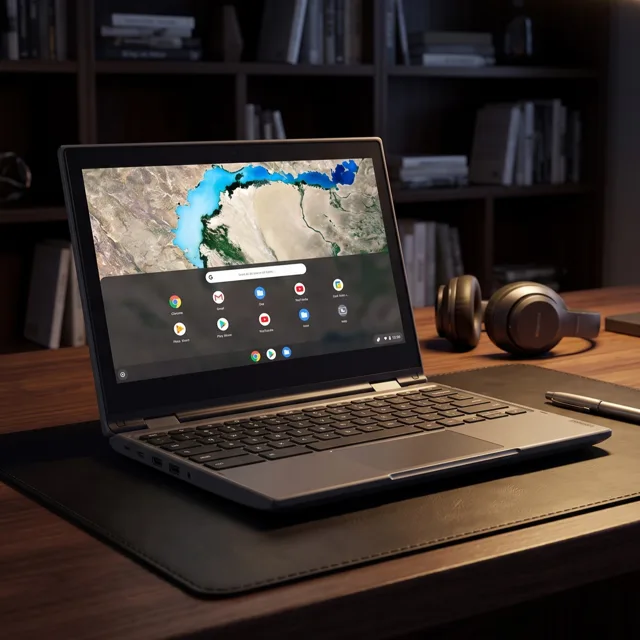
Lenovo 300e 2nd Gen 2-in-1 Chromebook Review
We may earn a commission from some links on this page.
The Lenovo 300e 2nd Gen is a small convertible Chromebook sold here as a refurbished unit. The listing describes an 11.6-inch touchscreen that folds through 360 degrees, so the machine can be used as a laptop or as a tablet, with 4GB of memory, 32GB of storage and a 1.7GHz processor. That is a modest specification, and it is aimed at the jobs a Chromebook does well: browsing, documents, video and schoolwork. The sections below cover the design, what Chrome OS is like on hardware this size, what 4GB and 32GB mean in practice, and what buying a refurbished unit involves.
Table of Contents
Key Takeaways
- The 11.6-inch touchscreen sits on a 360-degree hinge, so the machine works as a laptop, a stand or a tablet.
- 4GB of memory and 32GB of storage suit browser work and documents rather than heavy multitasking.
- The listing gives the processor as 1.7GHz, a modest chip that Chrome OS is designed to run well.
- The unit is refurbished, and the seller states that it is fully tested and fully functional.
- Chrome OS updates itself automatically and keeps apps in the browser, which suits a small low-power laptop.
Convertible Design and Touchscreen
A 2-in-1 Chromebook is a laptop whose screen folds all the way round on its hinge. Closed, it is a slab you can carry. Open at an angle, it is an ordinary laptop. Pushed past vertical into a tent or stand shape, it holds the screen up for video. Folded flat with the keyboard underneath, it is a tablet you use with a finger or a stylus.
The 11.6-inch touchscreen is what makes the tablet mode worth having. On a screen this size the on-screen keyboard takes up a fair share of the display, so the tablet mode is best for reading, browsing and watching rather than typing a long document. In laptop mode the physical keyboard does the work and the touchscreen becomes a shortcut for tapping links and scrolling.
The small size is the other part of the appeal. An 11.6-inch machine fits in a school bag or a tote, and it leaves room on a small desk or a train tray. The trade-off is less room for windows, which matters if you like two documents side by side.
Chrome OS on a Small Laptop
Chrome OS is built around the browser. You sign in with a Google account, your bookmarks and settings follow you, and most of the work happens in web apps: documents, mail, video, video calls and the rest. Updates install themselves in the background, so there is no long upgrade to schedule and no antivirus to manage in the way a Windows machine needs one.
That model suits hardware like this. A small processor and 4GB of memory feel slow when a desktop operating system is trying to run several heavy programs at once, but a browser-first system with one or two tabs in front of you is a much lighter load. The machine is at its best with a handful of tabs, a document and a video, rather than a dozen tabs and a photo editor.
There are limits worth knowing. Software that only runs on Windows or macOS will not install here, and some specialist tools have no web equivalent. For a second machine for study, travel or the kitchen table, that is rarely a problem; as the only computer for a job that depends on desktop software, it is the wrong tool.
Detailed Features
The specification is short, so the table below is the whole of it as the seller lists it.
| Feature | What is stated |
|---|---|
| Model | Lenovo 300e 2nd Gen |
| Type | 2-in-1 Chromebook and tablet |
| Screen | 11.6-inch touchscreen |
| Memory | 4GB RAM |
| Storage | 32GB |
| Processor | 1.7GHz |
| Operating system | Chrome OS |
| Condition | Refurbished, stated as fully tested and fully functional |
Three things decide whether a machine like this fits you:
- Whether your work lives in a browser, because that is where Chrome OS is strongest.
- Whether 32GB of storage is enough once your files are counted, or whether you will keep them in the cloud or on a drive.
- Whether a refurbished unit with the seller's stated testing is acceptable, or whether you want a new machine.
Living With 4GB of Memory and 32GB of Storage
4GB of memory is the figure that shapes daily use. It is comfortable for a browser with several tabs, a word processor and a video call, and it becomes tight when you add a second heavy app or a long video call with screen sharing. The practical habit is to close tabs you are not using and to keep one job in front of you rather than ten.
32GB of storage is modest, and the operating system and built-in apps take a share of it before you save anything. Documents and photos are small, so the squeeze comes from downloaded video, big presentations and installed apps. Two habits solve it: keep files in cloud storage and download only what you need for the day, or add a memory card or external drive if you regularly carry large files.
Neither limit is a fault. They are the reason this class of machine is small, light and inexpensive. The question is whether your work fits inside them, and for browsing, writing, email and streaming it usually does.
What Refurbished Means Here
Refurbished means the unit has been used or returned and then checked over before resale. The seller describes this one as fully tested and fully functional, which is the claim to hold them to. It does not mean new, and it does not promise a particular cosmetic condition, so expect the odd scuff on the lid or a worn key.
Before you buy a refurbished laptop, check three things: the return window, what the seller says about the battery, and whether a charger is included. Those details vary by listing and matter more on a used machine than on a new one. Keep the packaging until you have used the laptop for a few days and confirmed that the screen, the keyboard and the hinge all behave.
The upside is value. A refurbished small Chromebook is one of the cheapest ways to get a working laptop for browsing and documents, and the hardware is simple enough that there is little to go wrong beyond the battery and the hinge.
Advantages and Disadvantages
The strengths and weaknesses follow from the size and the price rather than from any unusual feature.
| Advantages | Disadvantages |
|---|---|
| Small and light enough for a bag, with an 11.6-inch screen | 4GB of memory limits heavy multitasking |
| The 360-degree hinge gives laptop, stand and tablet modes | 32GB of storage fills quickly without cloud or external storage |
| Chrome OS updates itself and needs little maintenance | Windows and macOS software will not run |
| A touchscreen makes browsing and reading easy in tablet mode | Refurbished condition varies, so check the seller's terms |
Verdict
The Lenovo 300e 2nd Gen makes sense as a second machine or a first laptop for schoolwork: small, touch-friendly and cheap enough that a knock in a bag is not a disaster. The 4GB of memory and 32GB of storage are the limits to accept going in, and Chrome OS is the reason the modest processor is not a problem. If you need Windows software, a larger screen or serious multitasking, spend more on a bigger machine; if you need a light laptop for the browser, this one covers it.
Frequently Asked Questions
Is the Lenovo 300e a Chromebook or a Tablet?
It is both. The 2-in-1 hinge folds through 360 degrees, so it works as a laptop with the keyboard, as a stand for video, or as a tablet with the keyboard folded away underneath.
Does It Have a Touchscreen?
Yes. The listing gives an 11.6-inch touchscreen, which is what makes the tablet mode usable for reading and browsing.
How Much Memory and Storage Does It Have?
The listing gives 4GB of memory and 32GB of storage, with a 1.7GHz processor. That is a modest specification aimed at browser work rather than heavy multitasking.
Is It New or Refurbished?
It is refurbished. The seller states that the unit is fully tested and fully functional, and it is worth checking the return window and battery details before you buy.
Can It Run Windows Programs?
No. It runs Chrome OS, so the work happens in the browser and in web apps. Software built only for Windows or macOS will not install on it.