
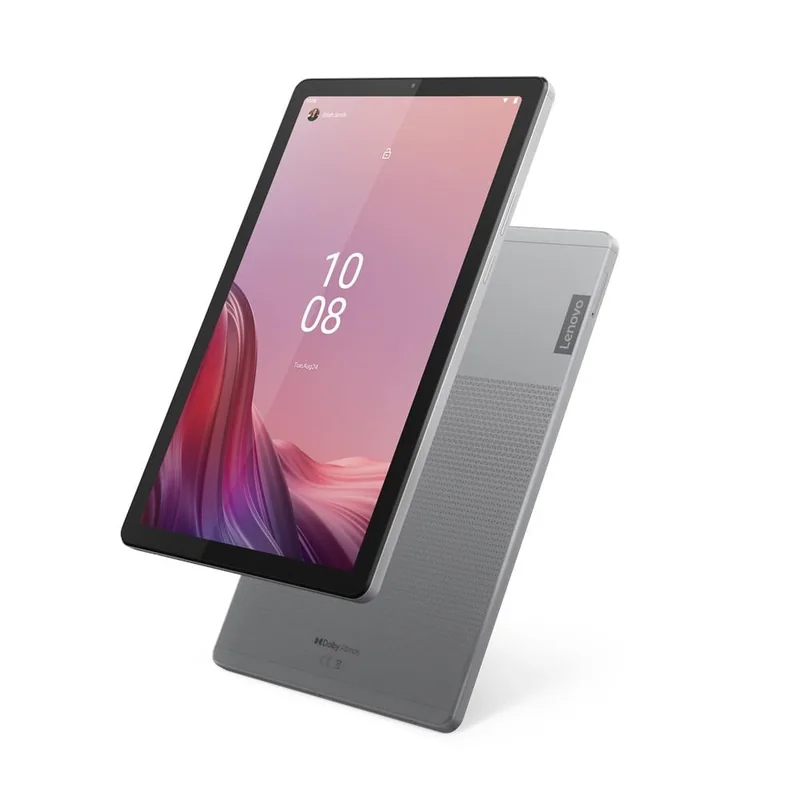
Lenovo Tab M9 Review: A Budget-Friendly Option
Discover the Lenovo Tab M9, a budget-friendly tablet offering a 9″ HD display with commendable color accuracy and brightness suitable for media consumption. With the MTK G80 processor, it handles everyday tasks smoothly, although the 32GB storage may require cautious app management. Its metal and glass build exudes a premium feel, while features like facial recognition and Google Lens enhance its utility. While the screen might not match high-end tablets and outdoor visibility could be better, it compensates with long-lasting battery life. Curious about its user experience and practicality? There’s more to explore about this cost-effective device.
Key Takeaways
- The Lenovo Tab M9 offers a 9″ HD display with vivid colors, suitable for streaming and casual browsing.
- It features a smooth media consumption experience with an MTK G80 Octa Core processor for light multitasking.
- The tablet’s battery life supports up to 13 hours of video playback, ideal for users on the go.
- Its metal and glass design provides a premium feel, although it has limited internal storage of 32GB.
- The device is cost-effective, with essential features and a simple, intuitive user interface for everyday tasks.
Affordable Tablet With Vivid Display
The Lenovo Tab M9 stands out as an affordable tablet, boasting a vivid 9″ HD display that appeals to those seeking quality visuals without breaking the bank. When you examine the display quality, you’ll notice it provides sharp images and vibrant colors, making it suitable for streaming and casual browsing. The color accuracy, while not perfect, is commendable for a device in this price range, ensuring that images and videos look natural and engaging. The screen’s brightness level supports comfortable reading and media consumption, although it may fall short if you’re in bright, outdoor settings. Overall, the Lenovo Tab M9’s display offers a solid experience for everyday use, delivering visuals that enhance your digital interactions without a hefty price tag.
Budget-Friendly Performance Summary
Shifting focus from the vibrant display to its performance, you’ll find that the Lenovo Tab M9 delivers impressive functionality for those on a budget. It meets user expectations for everyday tasks like media consumption, web browsing, and light multitasking. While budget constraints might limit its high-end gaming capabilities, it efficiently handles light gaming and essential productivity apps like Microsoft 365.
| Feature | Performance | User Expectation |
|---|---|---|
| Media Consumption | Smooth | High |
| Multitasking | Sufficient | Moderate |
| Storage Capacity | Limited (32GB) | Manageable with care |
Internal storage is modest at 32GB, which may require careful app management. However, the MTK G80 Octa Core processor guarantees smooth operation for a budget-friendly device, aligning well with practical user expectations.
Detailed Features
With a closer look at its detailed features, Lenovo’s Tab M9 stands out for its balanced combination of design and functionality. The device provides practical and user-friendly options for everyday use. Facial recognition allows for seamless and secure log-ins, adding a layer of convenience. Google Lens integration enhances your experience by enabling you to translate text or identify objects effortlessly. The tablet’s metal and glass design exudes a premium feel, complementing its 9″ HD display.
- Facial recognition for easy log-in
- Google Lens integration for translating and identifying
- Metal and glass design for a premium look
- 9″ HD display with vivid colors
- Supports a wide range of apps from Google Play Store
These features make the Tab M9 a versatile choice for budget-conscious users.
Advantages and Disadvantages Overview
When evaluating the Lenovo Tab M9, you’ll find its advantages lie in its affordability and functionality for everyday tasks. User feedback highlights its sturdy battery durability, offering up to 13 hours of video playback, making it ideal for prolonged use. However, it’s not without drawbacks. The internal storage is limited, and the display, though bright, may not meet everyone’s expectations for crispness.
Here’s a quick overview:
| Aspect | Advantages | Disadvantages |
|---|---|---|
| Price | Cost-effective | Lower-tier specs |
| Battery | Durable and long-lasting | None noted |
| Display and Design | Premium feel, bright screen | Not as crisp, limited storage |
Affordable, Versatile Tablet Option
Considering the Lenovo Tab M9’s strengths and limitations, this tablet emerges as an affordable and versatile option for users seeking functionality without breaking the bank. Its portability benefits make it ideal for users on the go, while the user interface is straightforward, offering an easy setup and synchronization with other Android devices. Although it comes with limited internal storage, the Tab M9 still supports a range of everyday tasks from media consumption to light multitasking.
- Portability: Lightweight and easy to carry.
- User Interface: Simple, intuitive, and Android-friendly.
- Battery Life: Lasts up to 13 hours with video playback.
- Display: 9″ HD screen, suitable for reading and streaming.
- Security: Features facial recognition for secure log-ins.
This makes the Lenovo Tab M9 a practical choice for budget-conscious consumers.
Frequently Asked Questions
Can the Lenovo Tab M9 Connect to External Monitors?
Imagine connecting your tablet to a larger canvas. You can use USB-C compatibility and HDMI adapter support to link the Lenovo Tab M9 to external monitors, expanding your device’s capabilities like a bridge to new possibilities.
Does the Lenovo Tab M9 Support Stylus or Pen Input?
You won’t find stylus accuracy or pen compatibility on the Lenovo Tab M9. The device lacks native support for stylus input, making it unsuitable for precise tasks like note-taking or drawing. Consider alternatives for pen input functionality.
How Does Lenovo Tab M9 Handle Software Updates?
When pondering the future of software updates, imagine a telegram. You’ll receive updates regularly, ensuring OS compatibility. The device handles updates efficiently, keeping your system secure and current without much hassle, enhancing your user experience substantially.
Is the Lenovo Tab M9 Waterproof or Water-Resistant?
You should know that the Lenovo Tab M9 lacks waterproof or splash protection features. Avoid water exposure, as it’s not designed to withstand spills or submersion. Consider protective accessories if you’re concerned about potential water damage.
Can the Lenovo Tab M9 Be Used With a Keyboard Accessory?
You can use the Lenovo Tab M9 with a keyboard accessory, enhancing your typing experience. Its compatibility allows for efficient use during tasks like emails or document editing, though it may not match a laptop’s full functionality.