
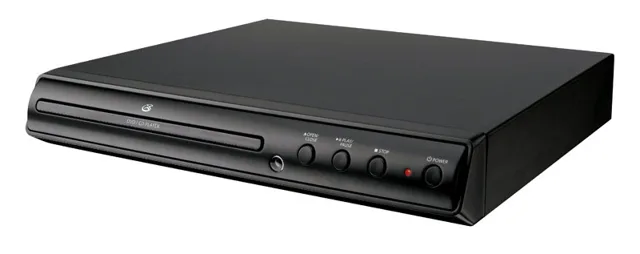
GPX DVD Player Review
We may earn a commission from some links on this page.
The GPX DVD Player is a basic disc player, not a smart box and not a burner. It plays the DVDs you already own, it needs a television to show them on, and it does nothing else. That is the whole pitch, and for a lot of people with a shelf of discs it is enough. This review sets out what that kind of player does well, where it stops, and who should buy one instead of paying for another streaming subscription.
Key Takeaways
- It is a disc player: it reads DVDs and shows them on a television, with no app store, account or subscription involved.
- Buy it if you already own discs, especially home-made DVD-Rs of family footage you have put onto disc.
- It plays discs. It does not record them, copy them or turn a tape into a disc.
- Region codes still apply to shop-bought DVDs, so discs pressed for another market may be refused.
- Picture quality is the disc's own: a standard DVD looks like a standard DVD, not like a 4K stream.
What the GPX DVD Player Is
GPX makes budget consumer electronics, and this is one of the simplest things it sells: a box with a disc tray, a remote and a video output. There is no operating system to update, no sign-in screen and no menu of channels. You put a disc in and the machine reads it.
That simplicity is the point. A player like this lives under a television and gets used a few times a month, when someone wants a film that is not on a service, a box set that never made the jump to streaming, or a disc of family video that a relative made and handed over in an envelope. It is also a simple way to find out whether a disc still plays before you decide what to do with the rest of a collection.
What it is not is a recorder. Nothing in this unit writes to a blank disc, and no player of this kind can pull video off a tape. If your goal is to get old tape footage onto a disc or a hard drive, that job needs a capture device and a computer, which is the second product in the box further down this page.
Playing Your Own Discs
The discs people actually still own fall into three groups, and the questions are different for each.
Shop-bought films and television are the easy case. A region 1 disc made for the US market is what a US-market player expects, and the disc carries its own menus and subtitles. Older titles can look soft on a large modern screen, because the disc holds standard-definition video; that is the disc, not the player.
Home-made DVD-Rs are the second group, and the reason a cheap second player is worth having. If a relative gave you a disc of a wedding or a holiday, a player like this is how you watch it without tying up a games console or a laptop. Discs that were burned years ago can fail, and a dedicated player is the quickest way to test one: if it plays here, the disc is fine.
Audio CDs are the third. Most players of this type will spin a CD and send the sound to the television, which is useful if the house has a disc collection and no CD player left. Treat that as a convenience rather than a hi-fi feature, and check the machine's own spec sheet if CD playback matters to you.
Detailed Features
The supplier gives a short listing rather than a full data sheet, so the table below sticks to what is certain about this machine and to the behaviour common to players of its kind.
| Type | DVD player |
|---|---|
| Brand | GPX |
| Discs | Plays DVDs; many players of this type also read audio CDs |
| Recording | None: it plays discs, it does not write them |
Two limits are worth knowing before you order. There is no upscaling promise here, so a standard DVD stays standard definition. And a player cannot defeat copy protection or region locks; a disc pressed for another market may simply be refused. Neither is a fault, but both decide whether this is the right machine for the shelf you have.
Advantages and Disadvantages
Reasons to consider it
- Plays the discs you already own, with no account and no monthly fee.
- A simple machine: a tray, a remote and a cable to the television.
- Useful as a second player for a bedroom, a spare room or a disc-testing bench.
- No network setup and no account, so it works as soon as it is plugged in.
Reasons to pause
- It cannot record, copy or digitise anything.
- No streaming apps, so it will not replace a smart TV stick.
- Standard-definition output only, which shows on a large screen.
- Region 1 focus: imported discs may not play.
A Player for the Living Room, or a Portable
A full-size player belongs under a television and stays there. If the discs travel, or the television is not where you watch, the same brand sells a portable version with its own screen. And if the real job is copying video rather than watching it, the second option below takes an HDMI signal into a computer, which is how footage gets from a player into a file.
Frequently Asked Questions
Does the player record or copy discs?
No. It is a player: it reads a disc and sends the picture to a television. Recording onto a blank disc, or copying a disc to a file, needs different equipment.
Will my home-made DVDs play in it?
Usually, yes. A DVD-R burned on a computer is what players of this kind are made to read, and a player is the quickest way to check whether an old disc still works. A disc that was never finalised when it was created may not play anywhere.
What do I need to connect it?
A television with a spare video input, and the cable that matches the player's output. Budget players have used both composite and HDMI sockets over the years, so check the listing's own description before ordering rather than assuming.
Does it stream Netflix or YouTube?
No. There are no apps and no network connection on a player of this kind. If streaming is the main use, a smart TV or a streaming stick is the right purchase instead.
Do discs from another country play?
Not always. DVDs carry a region code, and a player sold in the US is built for region 1. A disc pressed for Europe or Asia may be refused, and the player cannot be expected to get around that.